

👇🏻Process 👇🏻
You need ZArchiver (Available on Play Store)
➡️ Download ZArchiver ⬅️
Download The Location File:
⭐⭐⭐ Set-Up-Process ⭐⭐⭐
Your downloaded Location File name should look like 👇🏻 This
👉🏻 shaders.RENAME_HERE~3D 👈🏻
Now on ZArchiver, go to — Android> Data> com.dts.freefireth> files> contentcache> optional> android> gameassetbundles.
Now scroll to the DOWN, then you should see a file named like this 👇🏻
👉🏻 shaders._____________~3D 👈🏻
Now, just Hold the file then click Rename and Copy the full name of the file.
Now, go back and find the Location File, you just downloaded.
*** After finding the file, then you need to click and hold the File. Then click Rename and just paste the copied name that you just copied.
🔴 Final step 🔴
Now, click and hold the Downloaded Location File (You just renamed it now), then click copy. And now go to — Android> Data> com.dts.freefireth> files> contentcache> optional> android> gameassetbundles. Reaching there, just click the Paste and check mark ✔️ Apply to all files ✔️ then Click Replace
✅ DONE ✅
❗❗❗ Note ❗❗❗
- You need to download All the Files like Owned, Outfits Classic, Collection – Weapons, Collection – Others except Collection – Emote and Animation of section Outfits and Collections.
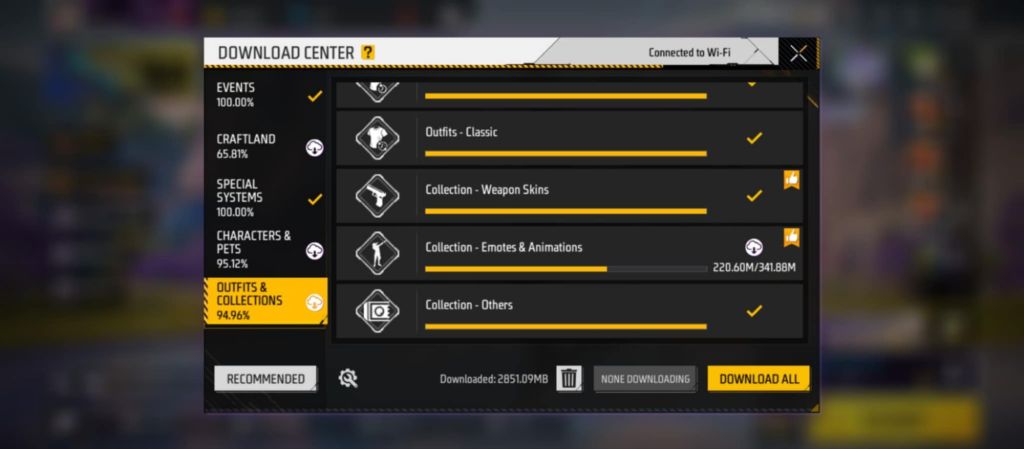
👉🏻 Outfits and Collections 👈🏻
- THIS HACK IS FULLY ANTI-BAN [GUARANTEED] , YOU CAN CHECK USING A GUEST ACCOUNT
- This Location File Can be used in all versions of Free Fire like – OB48, OB49, OB50, OB51, and all upcoming versions and updates.
- But Remember, You need to always rename the Location File because on every update of Free Fire the name of the File is changed. So Always rename it when it’s a new version.
- This Location File will work only in Free Fire not in Free Fire Max.
- For the visual Guide of Set-Up-Process, you can watch the video below 👇🏻
Thanks to All — Enjoy Your Hack

 DitomXTechnical